
Most products need five shots, in this order: hero, packshot, detail, scale, lifestyle. Two more are conditional: on-model or ghost mannequin if the product is worn, and a 360 spin if it is complex enough to be worth turning. That is the short answer to what product images do I need. The longer answer is that most brands over-shoot the images that look good and under-shoot the two that answer buyer questions, scale and detail.
Images are not decoration. Baymard Institute found the first action of 56% of test subjects was exploring images, before reading the description.
Shoot in that order, since each shot builds on lighting you have already set, and publish in roughly the same order.
- Hero wins the click in a grid of thumbnails.
- Packshot satisfies channel rules and makes your collection grid look considered.
- Detail justifies the price.
- Scale kills the “I thought it was bigger” return.
- Lifestyle answers “what would this look like in my life?”
Cheryl Barton shot hundreds of products a month for DaySpring, the Hallmark gift brand, on a fixed nine-shot checklist she built after too many emails asking for an angle she had not captured. Reshoots mean rebuilding the set and working for free. Across 15 years of product photography, the shot most often missing from a brief is scale.
Which image does which job:
| Image type | The buyer question it answers | Effort and cost | Priority |
| Hero | “Is this the right product?” | Low, one setup | Essential |
| Packshot | “Is this a real shop?” | Lowest, batches well | Essential |
| Detail | “Is it well made?” | Minimal, the set is already lit | Essential |
| Scale | “How big is it really?” | Low, a prop in an existing setup | Essential |
| Lifestyle | “What would this look like in my life?” | High: props, set, styling | Usually |
| On-model / ghost mannequin | “How will this look on me?” | High; moderate for ghost mannequin | Only if worn |
| 360 spin | “What is it like from every side?” | Highest, needs a rig | Rarely |
The 2026 baseline is roughly 6 to 8 images for a simple product, 8 to 12 for apparel, 10 to 15 for complex or tactile items like furniture. Channel slots are ceilings, not targets: one main plus eight secondary slots on Amazon, up to 24 free images on eBay, one primary plus ten additional plus a lifestyle image in Google Merchant Center. Etsy is unsettled: most 2026 guides say 10 photos plus a video, one newer source says 20, so check your own listing editor.
The answer still ranking for this question is from 2020 and says start with three. Reasonable then. Not now.

More images is not automatically better. An audit of over 1,000 live Shopify stores found an Add to Cart button buried below the fold on mobile was the most common conversion leak, on 65% of them. Merchants report it disappearing behind the photo carousel as images stack up.
Every other page answering this question is written by someone paid when you shoot more. At Kalory we know commercial photography, and its impact on a business, be it a start up or an established brand, and image nine rarely earns its place.
Use a horizontal swipe gallery rather than a vertical stack, and front-load it. Most shoppers never reach image five.
This guide covers which shots to take, not what size to save them at: exact specs are in our [e-commerce image sizes guide] [URL TBC].
The rest of this page takes each in turn and says when it earns its place.
1. Hero Image: The Shot That Has to Win the Customer Confidence
Your hero image is not competing on your product page. It competes in a grid of thumbnails against every rival product, and for most shoppers it is the only image they will ever see.
“Hero” gets used three ways: the main listing thumbnail, a big campaign image, and a styled lifestyle subtype. Here it means the primary listing image, the one in search results and collection grids. Brief a photographer with “main listing image” and the ambiguity goes.
Apply the test almost nobody states: shrink it to fingernail size, or open your collection page on your phone. If you cannot tell what the product is, it has failed. Fill the frame, cut props, one clear angle, even lighting. Upload order matters too: on eBay the first image uploaded becomes the gallery image in search results.
Use it when: always, every product, every channel. Single setup, and the first thing you light.
Skip it when: never. Skip instead the urge to make the hero your prettiest styled shot: most marketplaces require plain white with nothing in frame that is not for sale. Holding a whole range to one standard is the harder half of e-commerce photography.
Shoot it first, shoot it plain, and judge it at thumbnail size.
2. Packshot: The Clean Catalogue Shot Nobody Defines the Same Way
Ask three photographers what a packshot is and you get three answers. One of them will cost you a reshoot.
The term comes from UK advertising: the packshot was the closing shot of a commercial, showing the product and its packaging for shelf recognition. UK studios, ours included, still use it that way, while much US e-commerce writing uses it for any white background cut-out.
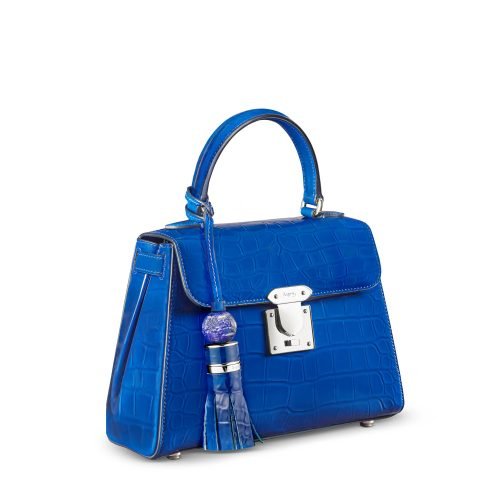
So brief the shot, not the word: “product on pure white, no packaging”, or “product with its box, on white”. Note that “individual shot”, “studio shot” and white background product photography are three labels for one photograph.
Its job is compliance and consistency. Nearly every marketplace demands a plain white main image with the product filling the frame, and consistent cut-outs make a collection grid read as a range rather than a jumble. The packaging variant matters most in FMCG, which is where packshot photography earns its name.
Best for: every physical product, and first if budget is tight. Packshots run roughly £10 to £25 per image at UK standard rates, from around £4.50 in bulk. Jewellery, glassware and heavy retouching push that up.
Skip if: you were planning to stop here. Alone, a packshot says nothing about scale or how a product fits a life, which is why catalogues 20 cut-outs deep convert badly. Two or three angles earn their place.
3. Detail and Macro Shots: The Cheapest Way to Justify Your Price
Your detail shots are already paid for. Once the product is lit for the packshot, two or three tight crops cost minutes, and they are the images that make a £90 product look like a £90 product.
They kill the “is this actually well made?” objection: stitching, grain, weave, hardware, the finish. Cheryl Barton recommends two to three per product specifically to support premium pricing. On watches and jewellery it is very often the shot that sells, because that is where the craft lives.
A macro crop needs an anchor. Seen cold, without a hero beside it, a tight crop confuses more than it reassures. Detail shots go after the hero and packshot, never before.
Use it when: materials, craftsmanship or finish are part of what you are charging for, which covers almost every considered purchase.
Skip it when: the product is genuinely uniform. A plain printed card or a flat-pack consumable gains nothing from a close crop. Skip the fourth and fifth macro too: gallery space is finite, and near-identical crops crowd out a scale shot that would do more.
Detail shots are the best value here, since the setup cost is sunk. Two or three is the right number.
4. Scale Shot: The Image Most Brands Miss and Most Returns Come From
Baymard Institute benchmarked 60 of the world’s largest e-commerce sites: 42% of shoppers try to judge a product’s size from the images, and 28% of those sites provide no in-scale image at all.
How big is it really?
Missing it costs you twice. Before the sale, shoppers who cannot size a product give up: Baymard watched one subject click through five images hunting for a size cue, then leave. After the sale, a size mismatch becomes a return, costing shipping both ways plus the restock.
Four ways to show scale, none needing a ruler:
- In hand. The default for small items, and what DaySpring used on gift lines because it beat printing “3 x 4 inches”.
- Worn, for jewellery, bags, eyewear and anything that lives on a body.
- Next to a known object: a coin, a credit card, a phone.
- In its typical-use environment, where the room does the work.
Baymard adds a caveat: AI-generated scale visuals can help across a large catalogue, but should supplement authentic photography, not replace it.
You cannot solve scale with a dimensions graphic on the main image. Major marketplaces bar text, logos and overlays that are not part of the physical product in the primary slot. So the main shot carries size through composition, and the callout goes in slot two, three or four, where high-converting listings tend to put it. Full rules: [marketplace product image requirements guide] [URL TBC].
Use it when: the buyer cannot size the product by eye from a plain white shot, which is most things. Jewellery, cosmetics, accessories, anything sold in several sizes. It is the cheapest high-impact addition here.
Skip it when: the product is a universally known size: a standard paperback, an A4 print, a 330ml can. And skip the ruler overlay on your main image, because the channel rules will reject it.
Add a scale shot to every product this week. It is the cheapest fix on this page.
5. Lifestyle Images: Context That Sells the Idea, Not Just the Object
Lifestyle is the shot founders budget for first and regret most often. On the right product it does work nothing else can.
It answers “what would this look like in my life?”, the only image type doing emotional rather than informational work. Amazon consultants call it chronically under-represented. Build it around one specific customer, not every buyer: a cat owner and a dog owner should not see the same photograph.
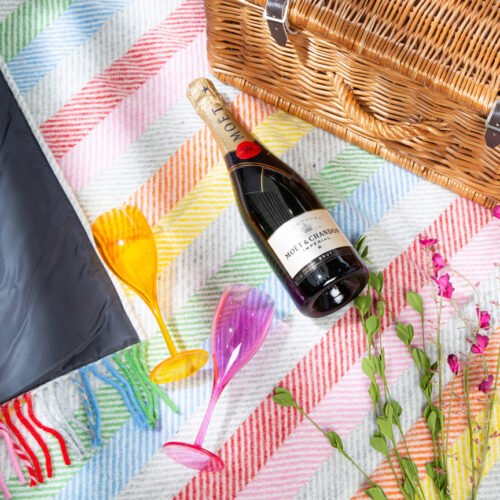
Cost is why it gets over-bought. It carries the heaviest styling burden of the non-model shots: props, set, location, stylist. A full UK studio day with creative direction and styling runs £1,000 to £1,600, so reserve it for bestsellers rather than the whole catalogue. Packshot photography vs lifestyle photography has the full trade-off.
Its cheaper cousin is flat lay product photography, an overhead arrangement that borrows lifestyle’s warmth for a fraction of the setup, and suits accessories, stationery, beauty and food.
Worth the money when: the product is bought emotionally. Homeware, gifting, food and drink, beauty, anything lifestyle-brand-led, or when you need assets beyond the product page.
Leave it out when: the product is technical and the buyer wants clarity, or the SKU is long-tail and will never recover the shoot cost. One trap: a lifestyle image without a size reference can mislead on scale, undoing your scale shot.
6. On Model and Ghost Mannequin: Showing Fit Without Guesswork
Ghost mannequin is the standard advice for apparel, and for a decent slice of a catalogue it is the wrong choice.
It shows shape and structure with no model fee. On-model shows how a garment falls on a real body, and doubles as a scale shot.
Route per garment instead. Structured pieces (shirts, jackets, tailored dresses) go to ghost mannequin product photography. Belts, socks and accessories go to flat lay.
Flowing garments such as maxi skirts and kimonos rely on movement, so a static form underwhelms. Hero and campaign pieces get on-model selectively.
| Method | What it shows | Relative cost |
| Flat lay | Colour and construction, little about fit | Lowest |
| Ghost mannequin | Shape and structure, catalogue-consistent | Low |
| On-model | Fit, drape, movement and scale | 30-50% more |
The gap is real. London fashion day rates sit around £600 for eight hours, models £50 to £150 a day, a stylist £300 to £600. But the cheaper method leaves fit uncertainty in place, and that drives returns.
Use it when: the product is worn. Apparel, footwear, bags, jewellery, eyewear, watches. If the question is “how will this look on me”, no packshot or detail crop answers it.
Skip it when: the product is not worn. Homeware, electronics, food and most hard goods gain nothing from a mannequin or model. Skip ghost mannequin on draped garments and tiny accessories.
7. 360 Spin: When Rotation Is Worth the Rig, and When It Is Not
The figures used to sell 360 photography, a bundle claiming lower bounce, higher add-to-cart and higher conversion, do not trace to any single study. We went looking. They appear stitched from unrelated case studies, so we will not repeat them.
A spin set is 24, 36 or 72 frames per rotation, shot on a turntable and processed as a set. More frames, smoother rotation, higher cost. It is the highest production complexity here.
The credible numbers are modest and category-bound: a small lift in automotive parts, a stronger result in one vendor’s case study, a furniture retailer whose view-to-cart rate rose with 360 plus AR. Spin pays on bulky, tactile goods.
Use it when: the product changes as it turns. Furniture, footwear, luggage, bags, technical hardware, or when you are already on a turntable.
Skip it when: the product is flat, symmetrical or well understood. Printed cards, posters, books and most commodity items gain nothing three still angles cannot.
For most brands the verdict is no, not yet.
Five essentials, two conditionals where the product demands them, and a scale shot on every SKU: that is what product images you need. If shooting a full range to one standard is eating your week, get in touch.
Product Image FAQs
What are the three types of product photography?
Most classifications reduce to three: the clean studio shot (packshot or white background), the detail or macro shot, and the lifestyle or in-context shot. Everything else on a typical list is a variation of one of those three, which is how competing guides claim 10, 11 or 15 types while describing the same photographs.
How do you make a good product image?
Decide what buyer question it has to answer before you set up the shot. The practical checks after that are consistent: even lighting, a clean background, the product filling the frame, the same angle and scale across the range, and a final look at thumbnail size. If an image answers no question, it is filler.
What is a packshot?
It depends who you ask. In UK advertising heritage a packshot is the clean shot of a product with its packaging, lit for shelf recognition, and many UK studios still use it that way. Much US e-commerce writing treats it as any white background cut-out. Describe the shot you want rather than naming it.
Can I put dimensions or a ruler graphic on my main product image?
Generally no on the major marketplaces. Main-image rules bar text, logos and graphics that are not part of the physical product, so size callouts belong in your secondary or gallery images. That is why composition has to carry scale on the main shot, using a hand, a familiar object or the product’s own environment.
Is ghost mannequin always the right choice for clothing?
No. It is the right default for structured, catalogue-backbone garments, and the wrong call for flowing pieces that rely on movement, for very small accessories where the technique is not worth the effort, and for brands whose story depends on a real person wearing the product.
Do I need to disclose AI-generated or AI-edited product images?
It depends on the edit and the channel. Background replacement, colour correction and lighting adjustment are generally accepted. AI generation that misrepresents the physical product being shipped is not, and substantial modification is expected to be disclosed. Etsy requires an explicit AI declaration plus disclosure in the description.